
Table of Contents
Let’s be clear: no cryptocurrency exchange or wallet guarantees 100% security for your money. Just like no mode of transport is protected from accidents, and no amount of healthcare guarantees eternal life. But this is normal, and you can improve the safety of your funds if you follow the principles of walllet protection.
There’s no recipe for how to ensure complete security in one setup. You cannot install a “magical” app and keep your digital assets permanently safeguarded. Thus, you must routinely check to see if everything is alright.
We’ve prepared a checklist on how to conduct 15-minute checks of your access points, devices, apps, permissions, and recent activity to significantly reduce the risk of wallet hacks and data leakage.
Why Do Small Security Checks Matter for Crypto Wallets?
Many cases of hacking and theft happen when a crypto user has multiple security problems all at once. Attackers quietly harvest information about device weaknesses, used services, transaction amounts, and software bugs over several weeks or months, build a profile of who might be the most suitable victim, and wait for loopholes to pile up over time.
Hackers do not usually use pure brute force to obtain your private keys because to guess your distinctive 256-bit string would take an absurd amount of computing power, essentially millions of years. It’s just easier for them to exploit vulnerabilities, rely on human negligence, and use phishing or scam pages.
So, you should not allow the risks to accumulate. It’s important to know what hackers are after. Bottlenecks include:
- Weak email protection
- Exchange accounts without 2FA
- Unlimited smart contract token approvals
- Old and broad dApp and extension permissions
- Outdated software, malware, or infected browsers
- Vulnerable keys (random vulnerability)
- Keys and seed phrases left in cloud storage or GitHub
Importantly, you can quickly and easily eliminate almost all of these weaknesses or avoid them altogether. All you need for that is a few minutes and a desire to be safe. Below, we offer a step-by-step instruction on how to protect your crypto wallet.
What Should You Check First: Access and Recovery
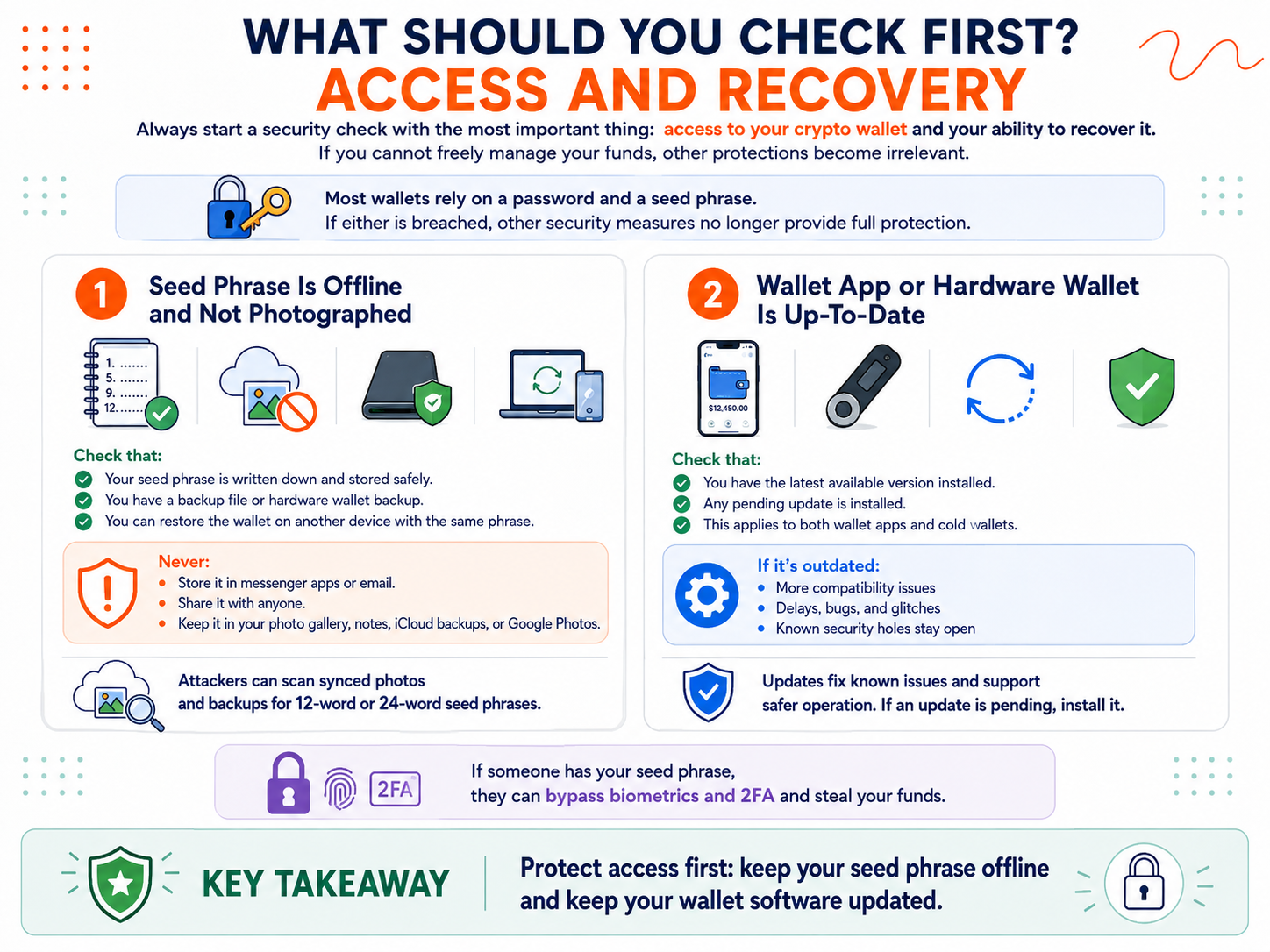
Always start a security check with the most important thing: access to your crypto wallet and your ability to recover it. If you cannot freely manage your funds, other protections become irrelevant.
Usually, to use a wallet app, you need a password and a seed phrase. If these are breached, the rest of your crypto wallet security measures will no longer provide full protection. Here’s what to check first.
Seed Phrase Is Offline and Not Photographed
Make sure that:
- You have the seed phrase written down and stored safely.
- You have a backup file or hardware wallet backup.
- You can set up the wallet again using the same phrase but a different gadget.
If someone has that phrase, they can easily get around biometric lock mechanisms and 2FA and steal the money. So it’s vital to save the key offline in private and verify that it is accessible only to you. Do not paste or type your secret phrase in a messenger app, even to save it to “Favorites.” Never send it through email or share with anybody.
It also must not appear in the photo gallery, notes, iCloud backups, or Google Photos. There are modern automated tools that can scan cloud-stored photos and define what screenshots or photos contain 12-word or 24-word phrases. If used for illegal purposes, these instruments help attackers inspect your online backups and synced images and find what they want.
Wallet App or Hardware Wallet Is Up-To-Date
If you have access to the wallet app, that’s good. But it’s even better if the program by default protects itself from external threats. This is achieved if the software is updated on time. Usually, the wallet sends you a notification that it needs to be updated. This also applies to cold wallets. Therefore, find out if you have the latest available version installed.
What happens when the wallet becomes outdated? Your money does not disappear. But outdated software can expose you to more risks. You may face problems with compatibility, delays, crooked interfaces, errors, and technical glitches.
If the wallet developers discover a security hole in the code, they release a fix. If you do not install an update, the issue does not get resolved, and the attackers get a chance to exploit your old version. So keep in mind that updates close known issues and support safe operation. If an update is pending for your crypto tools, install it.
How Should You Review Accounts, Passwords, and 2FA?
Let’s say that your wallet has been updated and is working as usual. You have ways to log in and restore access if necessary. Now proceed to checking passwords and accounts.
Please note that you will have to check not only protections of crypto services but also the ones related to basic, frequently used tools like email. These are often requested for secure action confirmation. Even if your wallet is protected properly, a connected account may become the weak point.
Email and Exchange Accounts
First, check if you still remember the email password. It should be a long and unique string of characters. To create it, use a password manager. Your primary address should be protected no worse than your wallet.
There is no schedule for changing your email password, so it should only be updated after a security breach, phishing, a suspicious login attempt, or if you suspect a compromise.
If you use an exchange for trading or storing large sums of assets, also log in and check your password. Then verify that the 2FA is working properly. Additionally, one of the best practices is to customize the withdrawal settings. Create a whitelist for withdrawals so that funds can only be sent to previously approved addresses.
Active Sessions and Trusted Devices
You should terminate unnecessary active sessions on all your platforms from time to time. Go to settings to get a list of devices that are currently logged in. Carefully check if there are any logins from unknown mobile phones, tablets, or computers or strange geographical locations. This is a simple step that users often skip. But by forcibly shutting down old sessions, you instantly block remote access to anyone who could have invisibly entered your account.
What Browser and App Permissions Should You Clean Up?
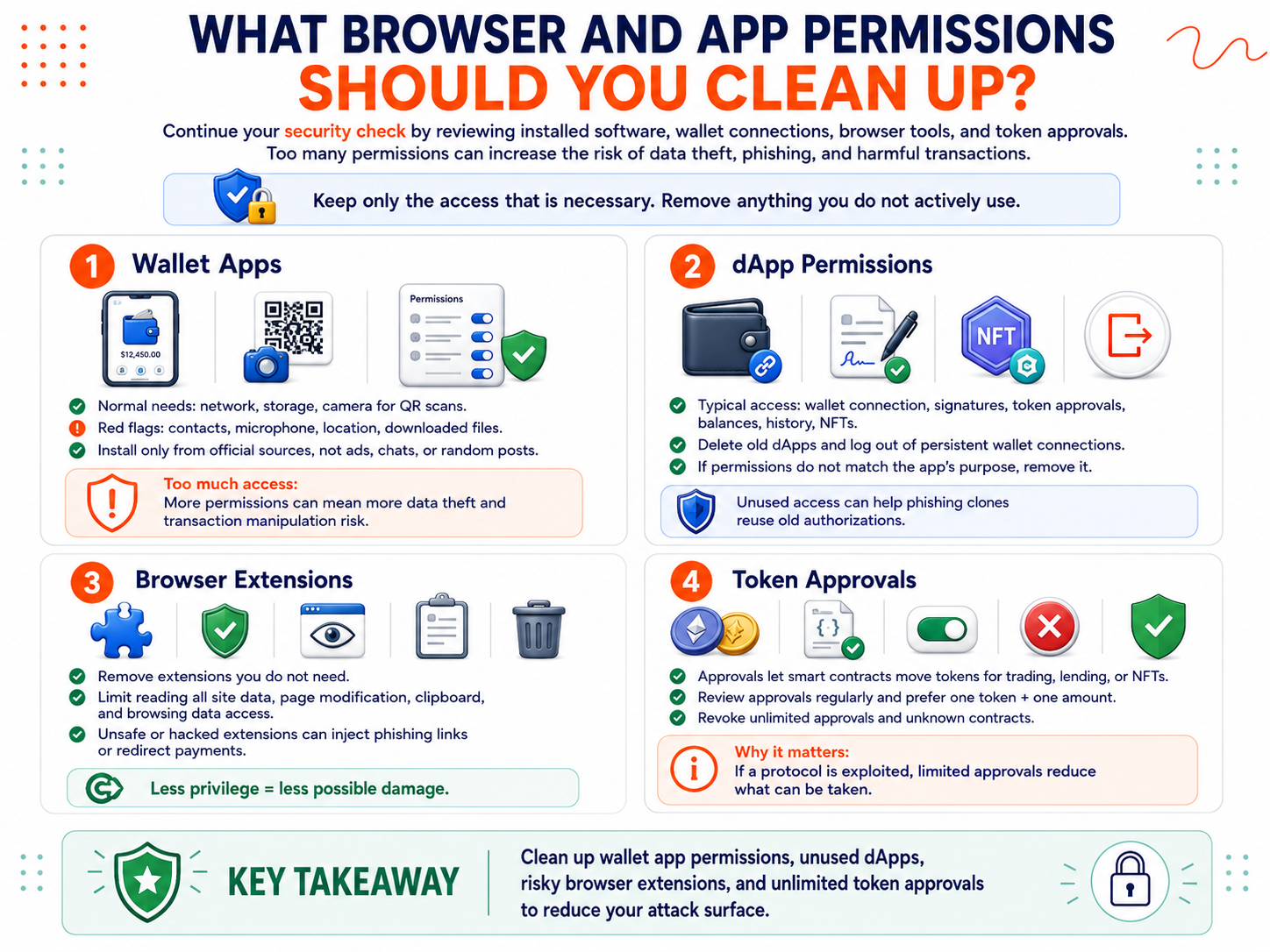
Not only compromised seed phrases and passwords constitute a risk to your money. For example, you may not even notice that you are using a malicious extension, an application with access to the wallet interface, or a program that can steal and modify data. Therefore, continue your security check with a focus on the installed software and its permissions.
Wallet Apps
A wallet app should do only what is necessary for signing and displaying transactions. It will basically ask for network access to connect to the blockchain, storage access to save app settings, account names, and local caches, and camera access if you use QR scanning. If it asks for broad device permissions, such as access to contacts, microphone, location, or downloaded files, it’s not okay. Too many permissions increase the chance of data theft and transaction manipulation.
Do not use random wallet-related tools from ads, chats, or posts. There are hundreds of initially malicious crypto-themed applications designed to steal wallet details, requests, session cookies, and transaction history. Install the apps via official sources.
dApp Permissions
Normal decentralized app permissions can be broader and depend on what the app was created for. Some dApps require permission to connect your crypto wallet address, request signatures or token approvals, monitor balances, view order history, and read your NFT ownership. These are required for trading, swapping, minting, staking, etc.
That’s why you have two rules here:
- Delete old dApps you no longer need. Log out of sites that have persistent wallet connections. Anything you don’t actively use must not continue to have access to your data or funds.
- Check whether the permissions match the app’s functionality. If you cannot find a logical reason why the tool requires certain permissions, it’s best to delete it.
This reduces the risk that a phishing clone reuses an old authorization or broad access to trick you into signing something harmful.
Browser Extensions
Probably you use browser extensions that help you manage passwords, correct grammar mistakes, record videos, block ads, or find coupons. These are tools for Chrome, Edge, Safari, and Firefox that provide extra functionality.
Not all of them are safe to use. Some are developed by scammers and include hidden tracking code to gather browser data and potentially execute scripts that change logins, redirect payments, and insert phishing links. Others are harmless but can be hacked. For example, a malicious update of the Trust Wallet’s extension resulted in the theft of $8.5 million.
So, the less privilege an extension has, the less damage it can do. Open the list of all your extensions, remove unnecessary tools, and, where possible, disable permission to read data on all websites, permission to modify page content, and access to the clipboard and browsing data.
Token Approvals
When you trade a token on Uniswap, deposit into the Aave lending protocol, or list an NFT for sale, you grant the smart contract permission to transfer your holdings from your wallet on your behalf.
Old token approvals need to be checked and managed regularly. Ideally, they should be limited to one token and one amount. If a protocol is exploited, the attacker will only get what is within the scope of that approval.
Pay attention to unlimited approvals, as they allow a smart contract to fully utilize your balance in this token at any time (even if you have not been using the contract for the last 10 years). Clean up approvals for unfamiliar contracts or infinite spend allowances and revoke anything else unnecessary.
What Recent Activity Should You Review?
Another important basic practice is to keep an eye on what’s going on inside your crypto wallet. Whether you maintain the balance stable or trade every day, you usually know what transactions, trades, and swaps you have made. Experts recommend reviewing the history of your operations to ensure that you recognize all recent activities.
Top red flags include:
- Unexpected outgoing transactions
- Unfamiliar approvals without your action
- Random tokens or NFTs you did not buy
- New dApps or smart contracts connected
- Unexpected login or recovery emails
- Strange wallet notifications and pop-ups
Justified concerns should cause any transfer you did not initiate, especially to an unfamiliar address, a new wallet connection to a suspicious app or site, and a sudden drop in token value. The latter could mean that you have been rug-pulled.
How to Create a 15-Minute Wallet Security Routine?
You need to understand what hackers search for and what makes their attacks much harder and less likely. If you do, you can boost your protections within 15 minutes. Follow these steps:
- Check that your seed phrase is stored securely offline. Make sure you can recover wallet access if needed.
- Install updates for your wallet app or hardware wallet. Outdated programs with legacy code and bugs do not improve your protection.
- Make sure that you remember the passwords for mail, wallet, and exchange accounts and that they are strong enough.
- Log in to check for old trusted devices and suspicious logins from unknown locations. Close out of active sessions you don’t need on all of the platforms you use.
- Keep only used extensions and disconnect your wallet from decentralized apps that you no longer need. Disable unlimited token approvals and ensure that all permissions your apps have are reasonable.
- Audit your transaction history to catch any unfamiliar transfers, phishing signals, or random token airdrops.
What Is the Main Security Habit to Keep?
If you do nothing to stay secure, crypto wallet vulnerabilities accumulate. They occur due to human errors, outdated software, weak passwords, forgotten connections, and broad permissions. If there are many weak zones, scammers and hackers can use them.
But if you regularly spend a couple of minutes and run a crypto wallet security check, you can reduce the risk of data leakage, phishing, and other crypto scams. You will learn where you have given too much access or too many permissions and possibly left weaknesses. This will help you eliminate issues before they lead to real problems like thefts.
For cryptocurrency users, it’s advisable to clear app access rights and have a limited number of browser extensions and dApps installed, especially if they are not directly connected to your daily trading activities.
Stay tuned and track your recent actions to keep your digital assets under your control. If you notice warning signs, stop signing and approving transactions. You should close the site and disconnect your wallet from any third-party platforms. If you feel like your funds are at risk, create a new crypto wallet on a clean device and transfer your money there.
Disclaimer: The content provided in this article is for educational and informational purposes only and should not be considered financial or investment advice. Interacting with blockchain, crypto assets, and Web3 applications involves risks, including the potential loss of funds. Venga encourages readers to conduct thorough research and understand the risks before engaging with any crypto assets or blockchain technologies. For more details, please refer to our terms of service.